Topology description
A single tier topology condensates all the mandatory modules of the infrastructure on a single hardware node. While such node can either be virtual or physical, we recommend using a physical server, dedicated to such infrastructure, so that maximum performance can be achieved.
The goal of this tutorial is to obtain the configuration showed in the following figure.
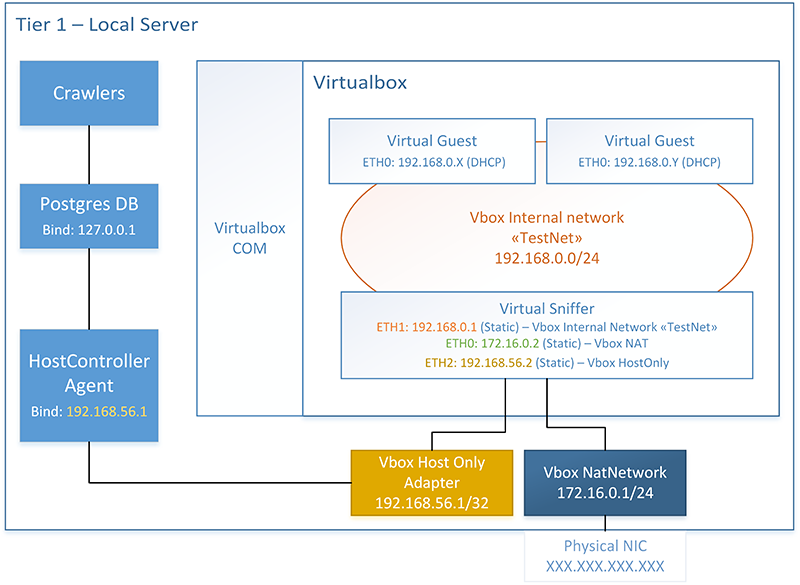
The host node has three distinct network interfaces. The first one is its physical NIC, used as main adapter when accessing the network. This interface will bind an IP address, marked as XXX.XXX.XXX.XXX, depending on how the user’s network is configured.
A second (virtual) network adapter, based on the Virtualbox Host Only driver, is installed on the Host. Such interface binds 192.168.56.1 and its goal is to enable local communication (within the host) between Host Controller Agent and the Virtual Sniffer. Therefore, the Host Controller Agent will explicitely bind 192.168.56.1 and ETH2 of Sniffer will bind 192.168.56.2.
A third network is emulated via the VirtualBox Nat Engine. Such network routes traffic incoming from the sniffer to the external internet, via NAT.
The Virtual Sniffer acts as a gateway, by forwarding traffic from 192.168.0.0/24 to 172.16.0.1/24, which is in turn routed to the Internet via the physical NIC of the server. This configuration is pretty heavy and involves cascading NAT. Therefore it does not scale nor perform well. However, since all NIC use paravirtualized network, this configuration is still suitable for a small number of sandboxes and requires no networking hardware to be implemented.
In the end, each sandbox has a single NIC, using DHCP to acquire an IP address. The sniffer uses dnsmasq service to provide both DNS realy and DHCP services on 192.168.0.0/24.